












It seems we can’t find what you’re looking for. Perhaps searching can help.
Sign Up for newsletter!
Subscribe to get the latest eBook!

Hotline
(+84) 28 7108 9908





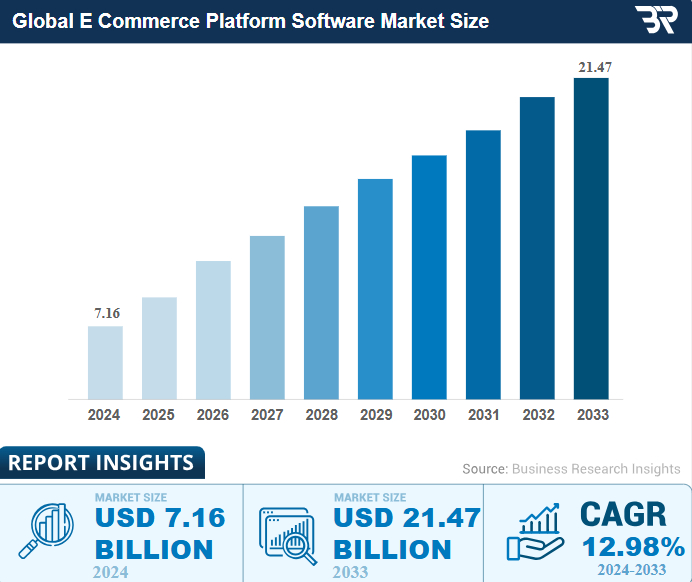
According to Business Research Insights, in 2023, the global e-commerce platform market size will exceed $7 billion, with projections to surpass $24 billion by 2031. The eCommerce market is growing fast and expected to triple by 2031. Yet, many businesses still struggle with disconnected systems that slow operations and fragment data. The solution lies in connecting everything that drives your online business – eCommerce Integration. So, What is eCommerce integration? Foundation of eCommerce automation?
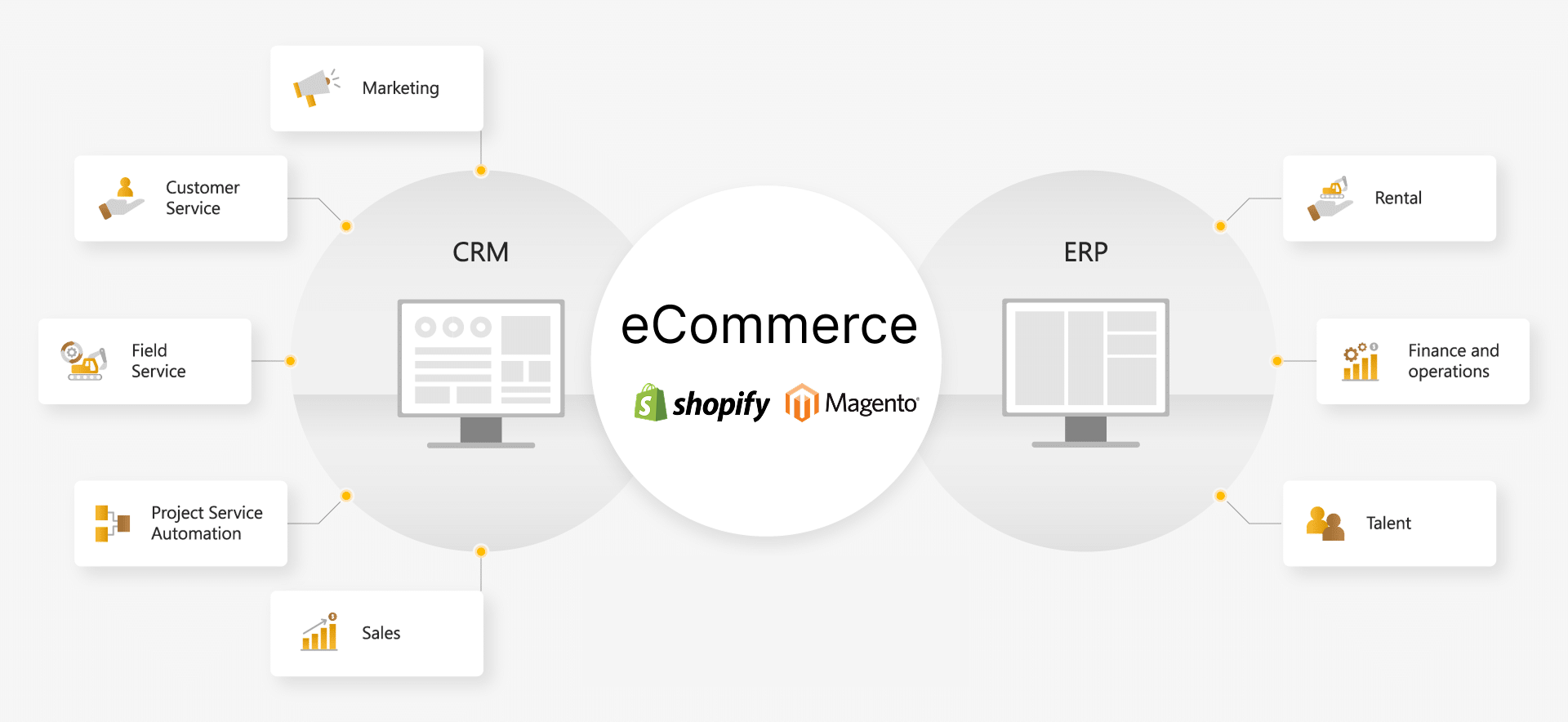
eCommerce integration is the process of connecting all digital systems that your online business relies on from storefronts and inventory to marketing and finance. Rather than treating each tool as a standalone platform, integration transforms them into one cohesive ecosystem where data flows freely, automatically, and accurately.
In simple terms, integration means your ERP, CRM, OMS, payment gateways, and marketing platforms can “talk” to each other, allowing your operations to run smoothly and your teams to focus on growth, not manual tasks.
When systems are integrated properly, your business gains transparency, speed, and scalability. You no longer need to manually update stock, export customer data, or reconcile reports – the systems do that for you, in real time.

Integration does more than link software; it creates the foundation for automation and intelligent decision-making.
When your eCommerce tools share data seamlessly, you can:
In other words, integration transforms your operations from reactive to proactive — giving you full control over your business ecosystem.
To build a truly connected and future-ready eCommerce ecosystem, businesses need a few key types of integration that unify all aspects of their operations.
Let’s explore the main categories that make modern commerce run efficiently:
ERP and CRM systems form the operational core of any eCommerce business. ERP manages financials, products, and inventory, while CRM centralizes customer profiles, interactions, and engagement data. When integrated, these systems give your business a unified view of both operations and customers.
Benefits:
Example: Integrating SAP Business One or Odoo ERP with Salesforce or HubSpot CRM enables automatic updates from orders to invoices and customer engagement data.
For enterprises managing massive data warehouses and fragmented data sources beyond standard CRM capabilities, implementing a Customer Data Platform (CDP) is the key to achieving a truly unified Single Customer View. Learn more about when to upgrade: What is a CDP? Comparing CDP and CRM
Order Management Systems (OMS) and Warehouse Management Systems (WMS) ensure that every order is processed efficiently and accurately. Integration between these systems automates fulfillment, reduces human error, and provides full visibility into inventory.
Benefits:
Example: Platforms like Manhattan Associates, NetSuite WMS, or ShipStation can integrate with eCommerce stores using middleware tools such as Boomi or Celigo.
Marketing integration bridges the gap between your online storefront and essential digital marketing ecosystems, such as Email Automation, CRM, and behavioral analytics platforms.
By establishing bi-directional data synchronization, businesses can move beyond manual processes to automate campaigns, hyper-personalize the customer journey, and measure marketing ROI with precision.
Key Benefits:
Real-Time Segmentation: Execute campaigns based on live customer data and segmentation.
Automated Workflows: Streamline post-purchase care chains or trigger abandoned cart reminders automatically.
Unified Analytics: Gain a holistic view of performance by cross-referencing sales data with marketing metrics.
Practical Application: Integrating robust platforms like Shopify or Magento with tools such as Klaviyo, Mailchimp, or HubSpot Marketing Hub allows businesses to trigger automated email flows tailored specifically to user purchasing behavior.
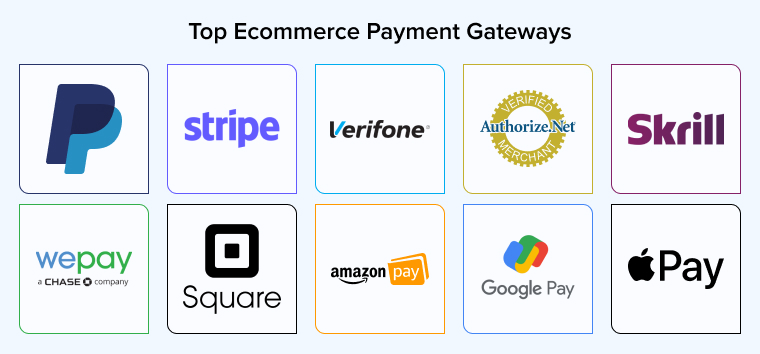
Payment integration connects your website directly with secure payment gateways, ensuring that every checkout process is swift, automated, and fully transparent.
By embedding these systems, businesses create a seamless financial workflow that enhances the customer experience while optimizing backend operations.
Key Benefits:
Streamlined Processing: Accelerates transaction speeds while significantly reducing manual entry errors.
Automated Financials: Enables automatic transaction reconciliation and real-time financial reporting.
Enhanced Security: Ensures strict adherence to PCI-DSS security standards, boosting brand credibility and customer trust.
Practical Application: Connecting global and local providers like Stripe, PayPal, ZaloPay, or MoMo directly to your eCommerce system ensures that every transaction is automatically updated in your accounting software and order management system.
Integrating analytics tools centralizes critical information, ranging from sales and marketing to logistics into a single, unified dashboard. This creates a “Single Source of Truth” for your enterprise, eliminating data silos.
By consolidating these data streams, businesses can transition from reactive reporting to proactive, data-driven decision-making.
Key Benefits:
360° Business View: Gain comprehensive visibility over all operational activities.
Real-Time Reporting: Monitor performance metrics and KPIs as they happen, not days later.
Unified Data Consistency: Ensure all departments—from marketing to inventory—are aligned with the same accurate datasets.
Practical Application: Aggregating data streams from diverse sources (Websites, Marketing channels, CRM, and eCommerce platforms) into visualization tools like Google Looker Studio, Power BI, or Tableau. This enables deep, comprehensive analysis of omnichannel performance
.
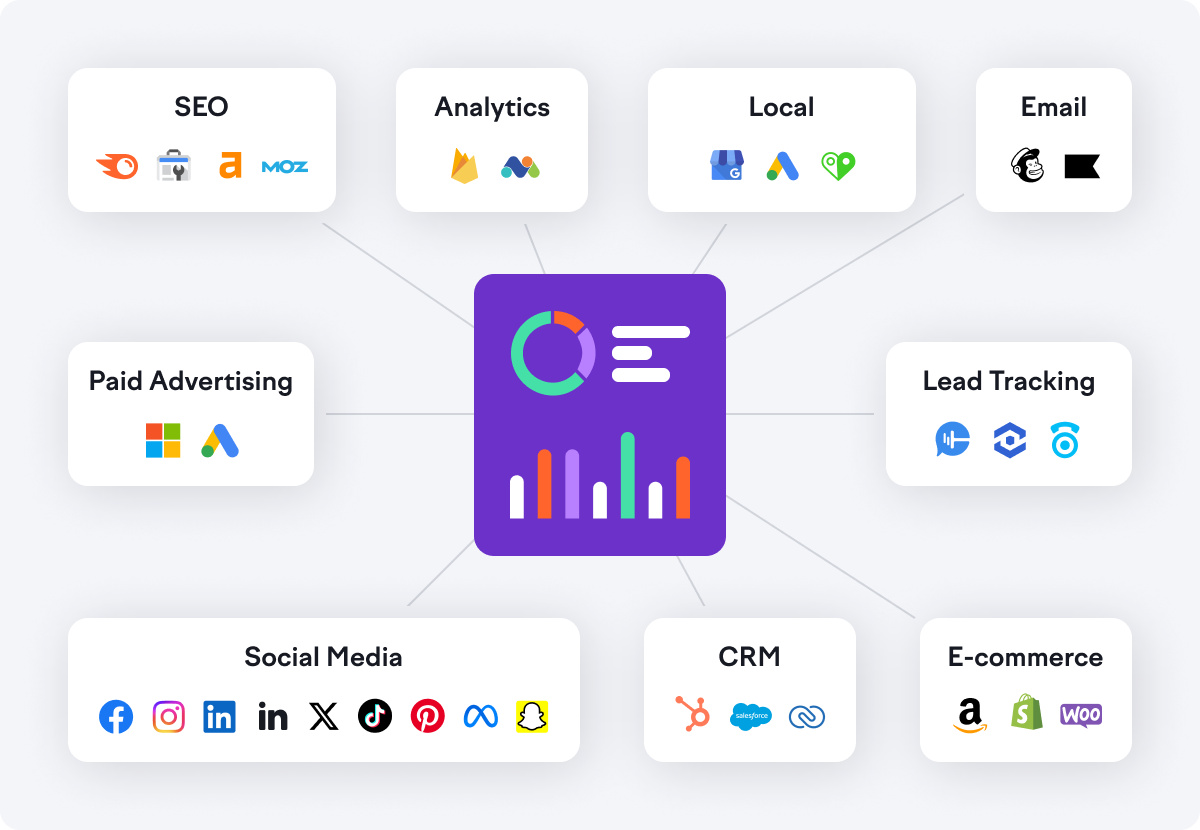
Omnichannel integration bridges the gap between your branded website, physical retail locations (POS), and third-party marketplaces, delivering a truly unified experience for your customers.
By dismantling the barriers between channels, businesses ensure that the customer journey is seamless, regardless of where the transaction begins or ends.
Key Benefits:
Unified Synchronization: Ensure pricing, promotions, and inventory levels are identical and up-to-date across every channel.
Centralized Management: Consolidate orders from all sources into a single interface, simplifying fulfillment and logistics.
Brand Consistency: Elevate customer loyalty and brand recognition by providing a consistent standard of service everywhere.
Practical Application: Leveraging middleware solutions like Celigo or Make.com to connect core platforms (e.g., Shopify Plus, Magento) with marketplaces like Shopee or Lazada. This ensures inventory, pricing, and customer data are synchronized in real-time.
Integration directly impacts every core metric that matters to online retailers:
Put simply, integration is no longer a technical upgrade; it’s a strategic necessity for sustainable eCommerce growth.
As the digital commerce landscape becomes more complex, integration defines how efficiently a business can operate and how quickly it can grow. It connects people, processes, and platforms into one intelligent system, laying the foundation for automation, innovation, and long-term success.
Secomm helps businesses design, build, and optimize integrated eCommerce ecosystems, transforming disconnected operations into streamlined, automated growth engines.
 1. Why is integration required before automation? 2. Which systems should be integrated first? 3. How long does an integration project take? 4. Should small businesses invest in integration?
 50
50
 6,078
6,078 0
0 20
20
According to research by Harvard Business Review, only 15% of professionals feel they have a comprehensive view of their customer data, making it extremely challenging to create effective online experiences. A common problem is data silos existing between Sales, Marketing, Customer Service, and Product teams. Today, this issue can be resolved with a CDP. So, what is a CDP? How does it differ from CRM, and which platform suits your business best?
A Customer Data Platform (CDP) is a customer data management system that collects, unifies, and analyzes data from various sources such as websites, mobile apps, social media, CRM systems, and point-of-sale (POS) systems. CDPs enable businesses to create a comprehensive 360-degree customer profile, providing a full view of the customer journey and allowing for personalized experiences at every touchpoint.
Unlike isolated storage systems, a CDP automatically gathers, cleanses, and synchronizes first-party data (directly owned by the business) in real-time, creating a solid foundation for data analysis and marketing automation.
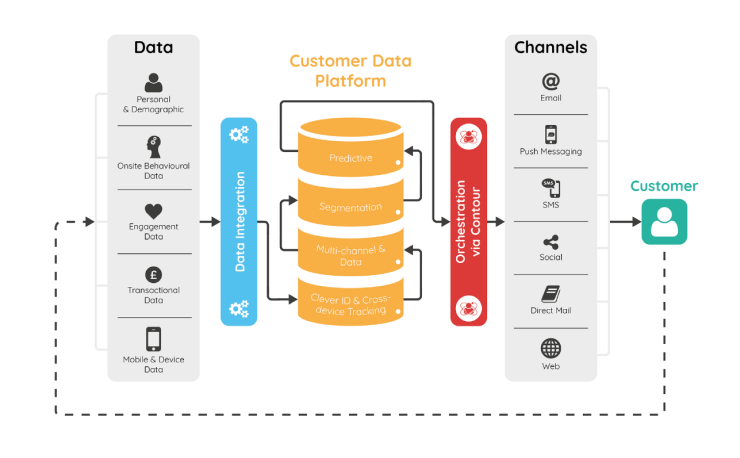
By adopting a CDP, businesses gain numerous advantages:
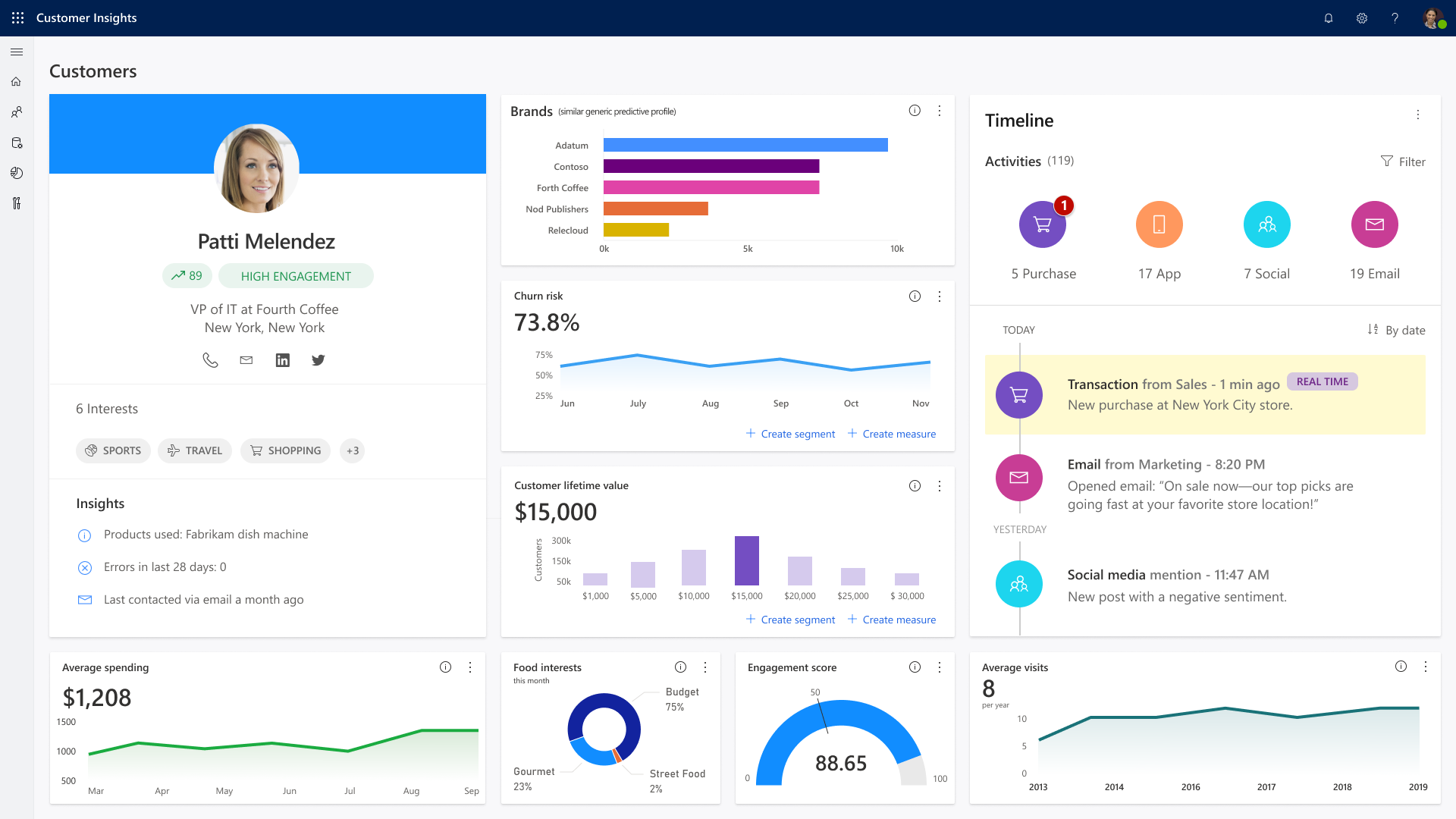
CDPs are ideal for medium to large businesses that pursue customer-centric strategies or are undergoing digital transformation.
Specifically:
Personalized Multichannel Marketing Campaigns
An eCommerce company uses a CDP to gather customer behavior data from its website, social media, email, and mobile app. When a customer frequently searches for sports products, the CDP automatically segments them and sends personalized email recommendations and timely promotions, delivers relevant content on Facebook, and displays personalized banners during website visits. This leads to significantly higher conversion rates and sales across marketing channels.
Optimizing Sales Processes and Upselling
Sales teams access consolidated CDP data: purchase history, interaction frequency, product search behavior to identify prospects likely to buy during weekends. The system can send short-term offers or related product promotions, increasing upsell and cross-sell opportunities.
Customer Journey Coordination and Performance Measurement
CDPs help marketers design seamless customer journeys from discovery to purchase and post-sale care. Businesses can identify and act on customers’ “golden moments” (e.g., purchase decisions triggered by free shipping vouchers). Detailed reports on conversion rates, average order value (AOV), customer acquisition cost (CAC), and effective customer segments optimize marketing strategy and budget.
Customer Relationship Management (CRM) software or solutions help businesses store, organize, and manage contact information and interaction histories with customers, potential clients, and current clients. CRMs track calls, emails, appointments, transactions, and service feedback and automate many sales and customer service processes. This supports improving customer experience, increasing revenue, and better customer retention.
Read more: https://secomm.vn/what-is-crm-top-5-benefits-of-using-crm-software/
| Criteria | CDP | CRM |
| Primary Purpose | Unified, analytical, and personalized multi-channel data | Manage relationships, communication history, and customer care |
| Data Type | Multi-source first-party data (behavior, transactions, journey, profiles) | Communication, existing transaction data with identified customers |
| 360° Customer Profile | Yes | Incomplete |
| Data Update Frequency | Automatic, real-time | Mainly manual or semi-automated |
| Main Use Cases | Customer insight, experience personalization, marketing optimization | Sales management, customer support, pipeline tracking |
| Primary Users | Marketing, data analysis, customer development strategy | Sales, customer service, relationship management |
In today’s competitive market, delivering a personalized customer experience is no longer optional; it’s a key driver for optimizing marketing efforts and accelerating business growth. Whether you choose a CDP or a CRM platform, selecting the right solution for your specific business needs is essential to improving operational efficiency and customer engagement.
If you’re looking for a trusted partner to help you implement, operate, and optimize your eCommerce ecosystem, don’t hesitate to reach out to SECOMM. We’re here to support you with expert guidance and tailored solutions to power your long-term growth.
What is a CDP and how does it work? What’s the main difference between CDP and CRM? Which businesses should use a CDP? Is CDP implementation complex and what is needed? Does CDP guarantee increased leads or revenue? Is the data stored on a CDP secure? 57 6,717 1 32Subscribe to get the latest eBook!
Hotline